

本記事では Android アプリケーションの開発中に見つかったファイルディスクリプタリークの事例をご紹介します。
見掛けの現象
社内で開発中の Android アプリケーションで、存在するはずのファイルを開けずエラーになることがありました。最初はファイルを開くコードの周辺に何か問題があるのではないかと考えましたが、当該部分に不審な点は見つかりませんでした。そのため次にファイルディスクリプタの枯渇を疑ったのですが、ファイルの閉じ忘れのような分かりやすいリークは見当たらず、すぐには原因を絞り込めませんでした。
実際の原因
そこで外部に似たような事例がないか探してみたところ、気になる記事を見つけました。
Finally, and most insidiously, Android Loopers require a file descriptor. If you create a Looper on a thread (for instance, if you wish to create a Handler on a thread which is not the main app thread), the Looper instance takes a file descriptor when Looper.prepare() is called. The file descriptor is only released when Looper.quit() (or Looper.quitSafely()) is called.Android Memory and File Descriptor Leaks, Diagnosis and Debugging
どうやら Looper を終了し忘れるとファイルディスクリプタが残ってしまうようです。Looper はメッセージループの実行に使われるクラスなので、利用後に明示的な終了が必要なのは比較的分かりやすい話です。一方でファイルディスクリプタが使われるというのはリファレンスからは想像しづらく思います。
ドキュメントを眺めて分からないならと実装を眺めてみました。どうも Looper は次のような構造になっているようです。内部の C++ で書かれた部分(こちらも Looper という名前なので少々混乱しますが)で epoll を使っており、それがファイルディスクリプタの登場する理由でした。
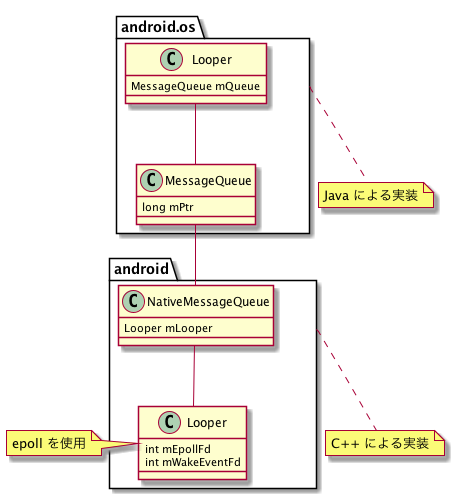
これで Looper の使い方がファイルディスクリプタリークの原因になり得そうと分かりました。そこで早速 Looper の利用箇所を調べてみると、AWS SDK for Android の中に問題のありそうなコードを見つけました。
final HandlerThread ht = new HandlerThread("Reconnect thread");
ht.start();
Looper looper = ht.getLooper();
Handler handler = new Handler(looper);
handler.postDelayed(new Runnable() {
    @Override
    public void run() {
        LOGGER.debug("TID: " + ht.getThreadId() + " trying to reconnect to session");
        if (mqttClient != null && !mqttClient.isConnected()) {
            reconnectToSession();
        }
    }
}, MILLIS_IN_ONE_SECOND * currentReconnectRetryTime);
HandlerThread を作り Looper を取得して使ってはいますが、終了している様子はありません。リークが起きていそうです。
動作検証
実際にリークが起きるかどうか、簡単なコードを書いて試してみました。わざと再接続が繰り返されるようにして Thread.activeCount() と lsof でスレッド数と開いているファイル数を調べたところ、再接続の度に両方の値が増えていきました。
public class MainActivity extends AppCompatActivity {

  private static final String TAG = MainActivity.class.getSimpleName();

  @Override
  protected void onCreate(Bundle savedInstanceState) {
    super.onCreate(savedInstanceState);
    setContentView(R.layout.activity_main);

    AWSIotMqttManager mqttManager = new AWSIotMqttManager("dummy-client-id", "nonexistent.iot.us-east-1.example.invalid");
    mqttManager.setReconnectRetryLimits(0, 0);   // 再接続の試行間隔を0秒にする
    mqttManager.setMaxAutoReconnectAttempts(-1); // 再接続の試行回数制限をなくす
    mqttManager.connect(
        new StaticCredentialsProvider(new BasicAWSCredentials("", "")),
        new AWSIotMqttClientStatusCallback() {
          @Override
          public void onStatusChanged(AWSIotMqttClientStatus status, Throwable throwable) {}
        }
    );

    (new Thread() {
      @Override
      public void run() {
        String ulimit = "ulimit -n";
        try {
          Log.e(TAG, "`" + ulimit + "` = " + execAndReadLines(ulimit)[0]);
        } catch (IOException e) {
          Log.e(TAG, "failed to run: " + ulimit, e);
        }
        while (true) {
          String lsof = "lsof -p " + android.os.Process.myPid();
          try {
            String[] lines = execAndReadLines(lsof);
            Log.e(TAG, "length of `" + lsof + "` = " + lines.length + ", number of active threads = " + Thread.activeCount());
            Thread.sleep(1000L);
          } catch (Exception e) {
            Log.e(TAG, "failed to run: " + lsof, e);
          }
        }
      }
    }).start();
  }

  private String[] execAndReadLines(String command) throws IOException {
    Process p = Runtime.getRuntime().exec(command);
    try (
        InputStream is = p.getInputStream();
        InputStreamReader isr = new InputStreamReader(is);
        BufferedReader br = new BufferedReader(isr);
    ) {
      ArrayList list = new ArrayList<>();
      while (true) {
        String s = br.readLine();
        if (s == null) {
          return list.toArray(new String[0]);
        }
        list.add(s);
      }
    } finally {
      p.destroy();
    }
  }

}
修正方法
おそらく最も簡便な修正方法は、不要になった Looper を終了するように直すことです。AWS SDK for Android にはそのようなプルリクエストを出してマージされ、新しい版(v2.9.1)に反映されています。より丁寧な修正としては、都度 Looper を作らずに使い回したり、あるいはそもそも Looper を使わない実装に置き換えたりすることも考えられそうです。
まとめ
ファイルディスクリプタの枯渇によるエラーは原因と直接関係のないところで発生しがちなので調査に手間がかかりやすいです。Crashlytics が影響を受けてしまい正しくクラッシュを集計できないなんてこともあり得ます。そのような現象には出会わないのが一番ですが、出会ってしまったとき本記事が解決の一助となれば幸いです。
